Collaborative Forecasting in Salesforce for Industrial Sales Teams
Configure stages around plant-floor milestones, not sales conversations.

Salesforce's Collaborative Forecasting module rolls opportunity data up the sales hierarchy so reps, managers, and finance can look at the same number and agree on what it means. For industrial sales teams, that number is only as good as what feeds it, and the default setup feeds it opportunity stages built for software deals, not plant floors. Get the account data wrong, and Collaborative Forecasting turns into a very organized way of forecasting a guess.
Why Salesforce forecasting falls short for industrial sales teams
Collaborative Forecasting does what it says. It takes opportunity records, sorts them into buckets like Pipeline, Best Case, and Commit based on stage, and rolls those buckets up the role hierarchy so a VP can see what every rep and manager underneath expects to close. Managers can adjust numbers up or down. Quota tracking sits right next to the pipeline view. As a mechanism, it works fine.
The trouble starts with what decides which bucket an opportunity lands in. Out of the box, that's stage, and stage is a judgment call a rep makes, not a fact about the account. It says nothing about what the plant actually manufactures, what equipment sits on the line, or what the account already buys from someone else. For a lot of B2B sales motions that gap doesn't matter much, because the buying process is short enough that rep judgment stays fairly accurate. Industrial buying doesn't work that way, and treating it like it does is the mistake most teams make when they roll Salesforce out unmodified.
A single opportunity at a manufacturing account often runs through eight to twelve stakeholders: engineering, procurement, plant operations, finance, sometimes a compliance or quality group on top of that. Research on industrial buying behavior from Forrester's B2B Buying Journey research puts the share of buyers who do serious research before ever contacting a vendor somewhere between 60 and 70 percent. The rep is often walking into a conversation that started without them, facing a buying committee whose size reflects what's actually at stake. A wrong spec doesn't just cost money in this world. It can stop a production line, void a warranty, or cause a safety incident. That's why the approval chain runs long and the sales cycle refuses to move at software speed.
What Collaborative Forecasting does inside Salesforce
Stripping away the terminology shows Collaborative Forecasting is a rollup engine with two directions of adjustment: top-down, where leadership sets expectations, and bottom-up, where each rep's opportunity data builds toward a number leadership can check against reality.
The mechanics are plain enough. Every opportunity gets mapped to a forecast category, usually Pipeline, Best Case, Commit, and Closed, based on where it sits in the stage progression. Those categories roll up the hierarchy, rep to manager to VP, so each layer sees a rolled-up projection for everyone below it. In Setup, under Forecast Settings, admins can turn on manager adjustments, letting a manager override either their own forecast or a direct report's number. That single adjustment changes how projections roll up for everyone below the manager who makes it. A rep sees one account. A manager sees the whole territory, and often knows things the rep hasn't found out yet.
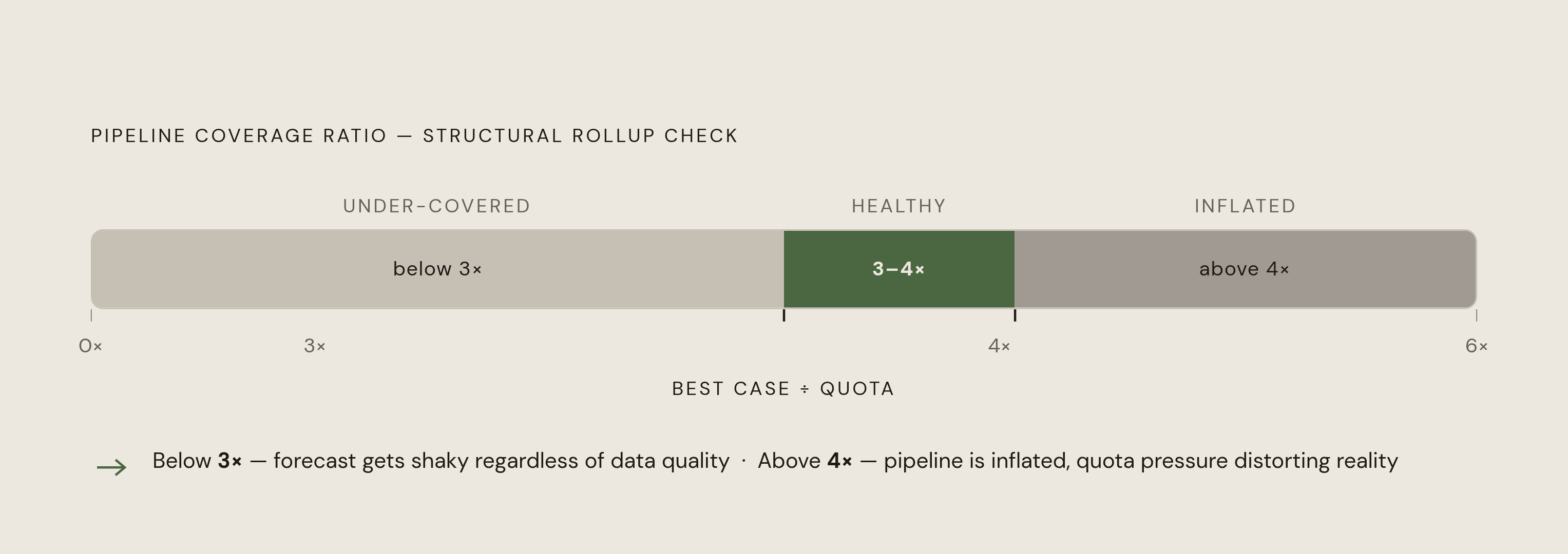
Salesforce also gives admins a choice between two rollup modes: category rollup, which shows each bucket as its own line, or cumulative rollup, where each category includes everything more likely than it. That choice changes how a sales leader reads coverage. Most organizations aim for pipeline coverage of three to four times quota, calculated as Best Case divided by Quota. Fall meaningfully under that ratio and the forecast gets shaky no matter how clean the underlying data is.
Where generic Salesforce setups break down for manufacturers specifically
A standard Salesforce build out of the box has opportunity stages that read like "Proposal Sent," "Negotiation," "Verbal Commit." Those labels describe a conversation. They say nothing about what's happening on a plant floor, and that mismatch is the core problem for manufacturers, not a minor annoyance to configure around later.
Industrial deals move on specification and validation, not on how the conversation is going. A rep sitting in the room while the spec gets written helps set the criteria the deal will be judged against. A rep who shows up after the spec is locked is reacting to someone else's criteria, and no amount of stage-naming in Salesforce changes that disadvantage. An opportunity marked "Proposal Sent" might still be months out if the process engineer hasn't signed off on chemical compatibility or throughput requirements. A generic stage map misses that, because it was never built to track equipment, process chemistry, or production volume.
There's a second layer to this, and it has less to do with CRM design than with where the real forecast actually lives. Plenty of manufacturers still build their real forecast in the ERP. Data gets pulled out of Salesforce or a spreadsheet, cleaned up, and pushed into a separate system by hand. That's slow, and every manual handoff is another chance for the number to drift from what's actually sitting in the pipeline.
Salesforce Manufacturing Cloud was built partly to close that gap, but the adoption pattern tells its own story: some teams abandon it within months, and a common pattern is that finance never fully transitions away from its own tools. Sales adopts the new tool, finance keeps working out of its own spreadsheets, and the two numbers stop matching before long. The implementations that hold up bridge Salesforce into finance's existing workflow on purpose, often through a Salesforce-Excel connection that acts as a translator instead of asking finance to abandon what already works.
Configuring Collaborative Forecasting for an industrial sales motion
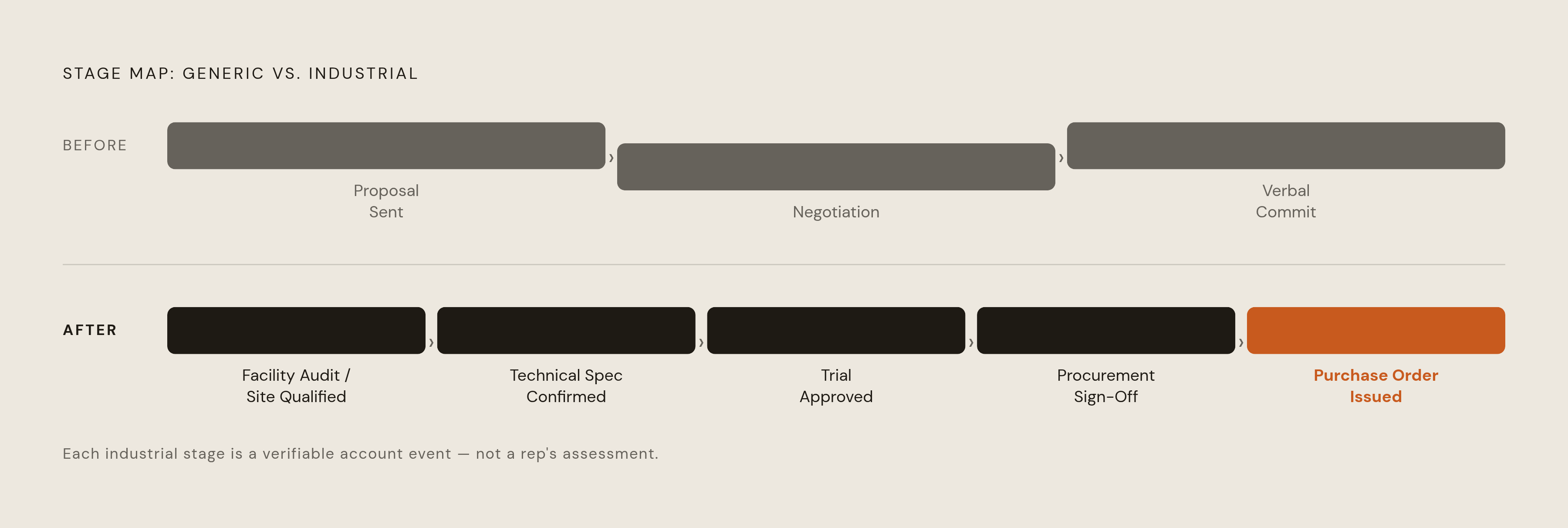
Fixing this starts with the stage map, before anyone touches a single forecast setting. Instead of generic conversation milestones, stages should track events that actually happen at an industrial account: facility audit or site qualification, technical specification confirmed, product trial approved, procurement sign-off, purchase order issued. Each stage should map to a forecast category that reflects the real odds of closing at that point.
Manager adjustments should get turned on deliberately, not left wherever the default lands. In Forecast Settings, there's a checkbox letting managers adjust both their own number and their direct reports'. In industrial sales this adjustment is often the single most valuable input in the whole system, because a manager typically sees across accounts and competitive dynamics in a way a rep working one territory simply can't.
Rollup mode is worth deciding early instead of accepting the default. Cumulative pipeline rollup gives leadership a fuller read on total coverage by including everything above a given likelihood threshold. Category-only rollup keeps each bucket separate, which can make it harder to see the full shape of the pipeline at a glance, and that's what blows up a forecast in the last two weeks of a quarter.
The bigger structural move is getting past opportunity-only forecasting. Manufacturing Cloud introduces Sales Agreements, which support account-based forecasting built on orders, standing agreements, and historical demand rather than a single closed-won event. That's a closer match to how industrial accounts buy: recurring volume against a contract. Manufacturing Cloud is designed to connect that agreement data with ERP and order data, so the CRM can reflect real demand activity instead of a rep's best guess at what's coming.
The data that determines whether the forecast number is trustworthy
Collaborative Forecasting doesn't generate insight on its own. It rolls up whatever reps put into it, and what reps put into it depends entirely on what they know about the account before they type anything into Salesforce. That's the whole game, and it's why arguments about forecast methodology miss the point if the underlying account data is thin.
Plant-level data changes what a rep can put into the system in a few concrete ways. A company name turns into a real prospect once the rep knows what a facility actually makes: a specific plant running a specific process. Knowing what equipment runs on that line narrows the opportunity down to specific products and quantities, which makes the dollar value on the record something closer to reality than a guess. Knowing the plant's production volume gives a rep a deal-size estimate grounded in actual throughput before the first call happens, instead of a number pulled from thin air and rounded to something that sounds reasonable. And knowing real-time signals, a capital investment announcement, a plant expansion, a new regulatory filing, tells a rep when to show up. In industrial sales, timing the approach right matters as much as picking the right account.
A rep who already knows the process chemistry, the equipment on the floor, and who currently supplies the plant changes the conversation itself. That's not just a better sales call. The opportunity record that comes out of it carries a stage assignment and a dollar figure with real signal behind them, and that's what an accurate forecast actually runs on.
How plant-level manufacturing intelligence feeds better forecasts in practice
Three patterns appear repeatedly where account intelligence changes forecast quality, and none of them are subtle once you know to look for them.
The first is qualification before an opportunity even gets created. A facility profile showing production volume, process type, and equipment in use lets a rep and manager judge whether a deal is real before it inflates the pipeline. Pipeline inflation, opportunities that never had a real shot, is one of the quieter ways forecast rollups drift away from reality.
The second is sizing. A rep who knows a plant's annual output or run-rate on relevant equipment can build a deal-size estimate that holds up to scrutiny, instead of rounding to a comfortable number because the real figure isn't known. That comfortable-number habit is one of the most common sources of forecast error late in a quarter, and it's almost entirely a data problem, not a sales-skill problem.
The third is stage verification. When a rep moves a deal from "Technical Review" to "Commit," a manager who knows the plant's procurement cycle, its production calendar, or its existing supplier relationship can check that jump against something real. Without facility-level data, that check doesn't happen, and the manager ends up approving stage moves on faith.
When Salesforce account records carry real plant data, production type, equipment, output, activity signals, Einstein's forecasting models train on richer inputs, manager adjustments get sharper, and the rollup starts reflecting the account base as it actually exists rather than as reps perceive it. Research on manufacturing forecasting points to exactly this trend: manufacturers connecting CRM, ERP, and operations data into single forecasting models so every function, sales, finance, ops, works off the same picture. That's the direction the industrial commercial function is heading, and teams still running opportunity-only forecasts off stage alone are already behind it.
It matters for a more human reason too. Consultative selling, walking in and talking about a customer's process instead of reciting a product sheet, is a strength that field research puts at only around 30 percent of reps. Plant-level data doesn't replace that skill, but it hands a much larger share of a sales team the context to approximate it convincingly, without years of domain background behind them.
Territory structure and its effect on what the forecast can and cannot see
Forecast accuracy is, quietly, a map problem. Drawing territories wrong causes entire clusters of addressable manufacturing facilities to end up with no rep assigned to them; those facilities never enter the pipeline and never appear as a gap in anyone's forecast, because a forecast can't flag an absence it doesn't know exists.
The most common mistake in territory design is building around headcount: structuring territories to match the number of sellers available rather than where the revenue potential actually sits. That approach ignores where the actual revenue potential sits, and it's backwards. Territory planning built around market potential instead of seller count, weighing region, account tier, and segment, has been shown to lift revenue by 2 to 7 percent without adding a single rep, largely by closing coverage gaps and cutting down on reps stepping on each other's accounts.
For manufacturers specifically, geographic or channel-based territory design tends to fit best where distributor relationships and local service coverage matter, which describes most industrial dealer networks. Teams selling across genuinely different product lines (industrial equipment versus specialty chemistry, for instance) sometimes split by product category instead, since the buyer and the technical conversation differ enough to need separate expertise. Either way, the design has to start with the market: which industries, regions, and account tiers hold the revenue, not how many territories need filling. Get that backwards, and no amount of forecast configuration in Salesforce fixes the blind spot it creates.